Applications
A new version of Transcribable is available for Android 1.04.09 & Wear OS 1.01.01
descriptionStandardA new version of Transcribable is available for Android 1.04.03 & Wear OS 1.00.16
descriptionStandardA new version of Transcribable is available for Android 1.03.01 & Wear OS 1.00.14
descriptionStandardA new version of Transcribable for WearOS is available 1.00.13
descriptionStandardA new version of Transcribable for Android is available now for early access
descriptionStandardTranscribable for Android available now for early access
descriptionStandard
Read more: Transcribable for Android available now for early access
Capture voice notes as text and share your transcriptions with other applications. Transcribable supports the conversion of speech to text using your Android device or Wear OS watch. The device application collates your transcriptions to a file allowing you to easily refer back to or export notes stored on your device.
Continue readingWeDroid – A Python 3 Module for generating Weather reports
Please note: This page is currently being redesigned; you can visit the project repository at:
WeDroid source available on GitLab
WeDroid available on PyPi
WeDroid is a weather summary & announcement package for Python 3, cross platform (runs on anything that can run Python 3.9+) with additional bonuses for Android users through support for Tasker and/or Termux.
WeDroid for Python 3
Get started with:
pip install wedroid- View source on GitLab released under a Apache License 2.0.
- View the package on PyPi.org, alternatively get started with (CLI + venv):
pip install wedroid. - View the WeDroid module documentation.
WeDroid Observation and Forecast Previews
WeDroid weather observation example
WeDroid weather forecast example
WeDroid + Termux + Tasker + Android
The Tasker integration allows WeDroid to update variables declared in Tasker (through an Intent); you can use these Tasker variables to then trigger additional tasks for example Text-to-speech. Termux is used to provide a shell and enable the installation of Python 3 and uses Termux-API to access the device location; view the source for this integration in Termux integation WeDroid.
If you’re eager to try it for yourself (that is: running WeDroid on Android via Termux using Tasker as the controller/trigger); it’s relatively straight forward and the information below should help you get started:
The entire Tasker WeDroid project can be downloaded at: WeDroid > Examples > Tasker
Background and purpose
As previously mentioned in “Unveiling WeDroid a weather assistant module for Python 3“; WeDroid was originally a weather reporting script that returned the current weather status in a short message form. It was written right after the Metal Gear Solid V: The Phantom Pain’s release and was heavily influenced by the iDroid weather reports that Venom Snake would receive in-game. These reports would indicate drastic changes like sandstorms, rain, or the weather clearing.
Installation requirements (Android)
- Tasker
- Termux (other shells are likely supported where you can install Python 3)
- Termux configured to access local storage
- Termux:API plugin
- If you intend to allow WeDroid to access location data Termux:API needs to be configured to allow location access.
- Termux:Tasker plugin
When used with Tasker on Android you can define a task and/or profile which can run the WeDroid announcement service.
Tasker Workflow
To summarise Tasker is used to:
- Run WeDroid on a schedule.
- Process an intent created from WeDroid with various pieces of weather data and extract the values to Tasker variables.
- Then trigger an announcement (or action/s) when certain changes occur.
The simplest use case is to trigger a WeDroid observation every hour; and when the %WD_ANNOUNCEMENT variable is update speak the content using text-to-speech.
Tasker configuration breakdown
To run WeDroid and Python 3 under Termux with Tasker review the following details:
- Python 3 via Termux requires:
- Termux to be installed.
- Python 3 package is installed with:
pkg install python. - WeDroid installed with:
pip install wedroid. - In your home directory create a WeDroid configuration with:
wedroid -d. - Once created edit
wedroid_settings.jsonand add your OWM (OpenWeatherMap) API key, create one here.
- The Tasker Task responsible for running WeDroid is “Run Termux Script” provided by Termux:Tasker:
- It should execute:
/data/data/com.termux/files/usr/bin/wedroid -t "observation" -lt "14.0" -lc 812- In executable add:
/data/data/com.termux/files/usr/bin/wedroid - In arguments add:
-t "observation" -lt "14.0" -lc 812optionally include a path to your configuration if in a different location:-c "/path/to/some/where/wedroid_settings.json"
- In executable add:
- Or import the Template Tasker Task: WeDroid Observation Script
- It should execute:
Task breakdown
The screenshot below demonstrates how to configure a Termux:Tasker action within Tasker; take note of the executable file: /data/data/com.termux/files/usr/bin/wedroid
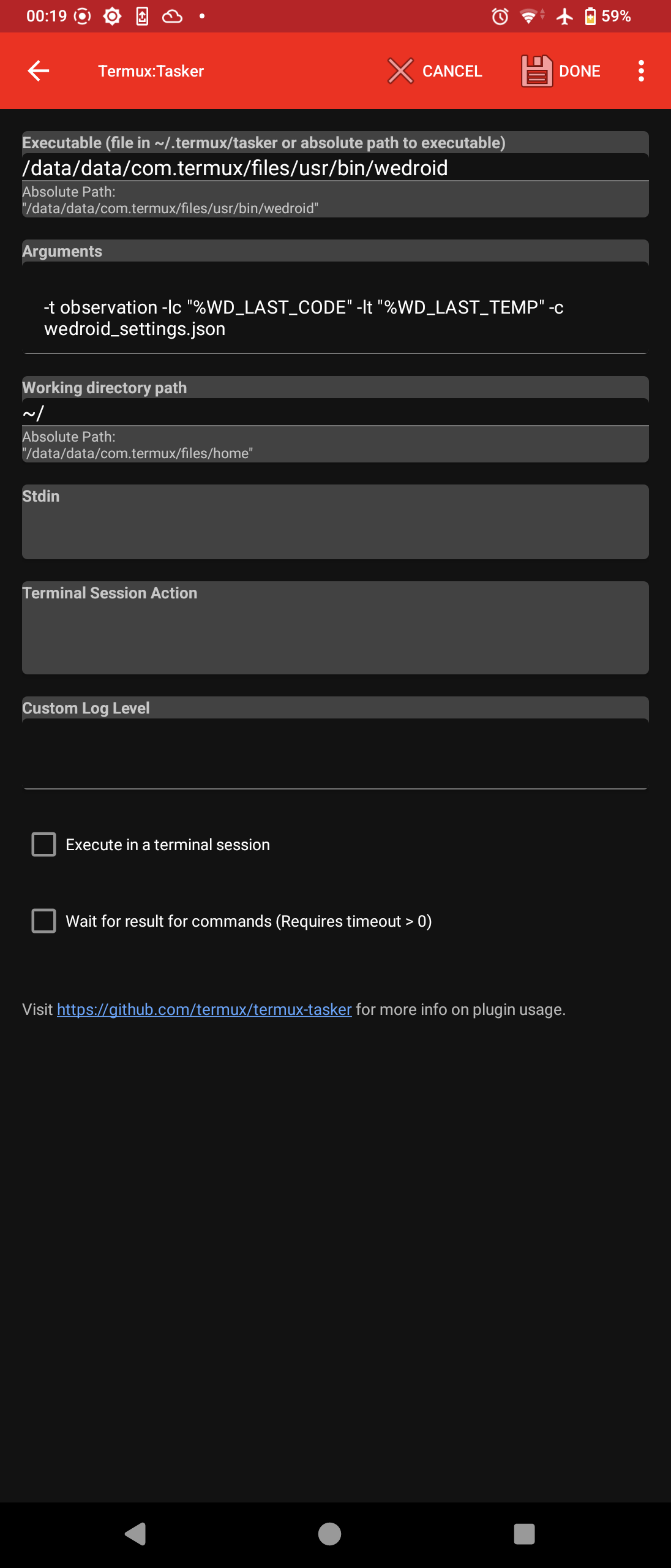
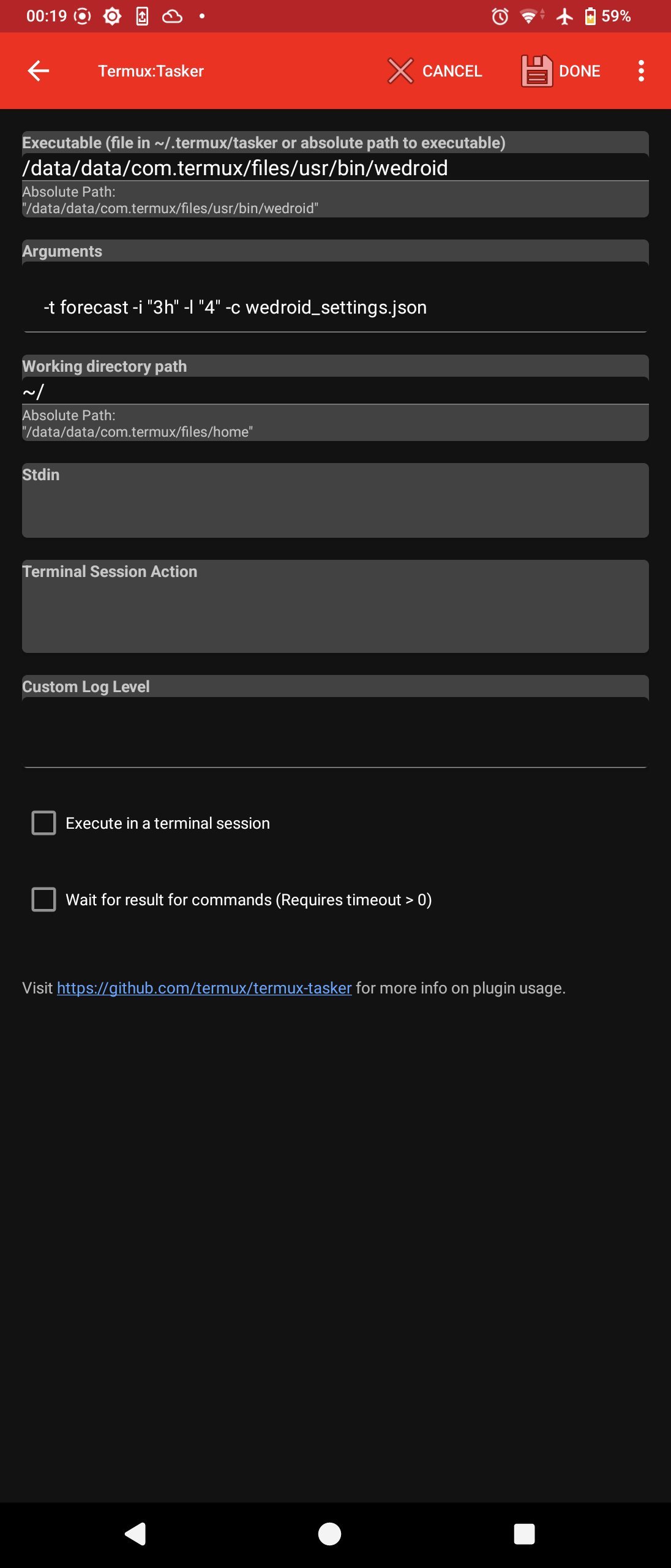
At this point the basic configuration aspect is complete; run the newly created task to ensure that it is working as expected.
If you run a observation or forecast; once complete, WeDroid sends an intent back to Tasker with various data variables and the Task name (WeDroid Received) that will parse these values:
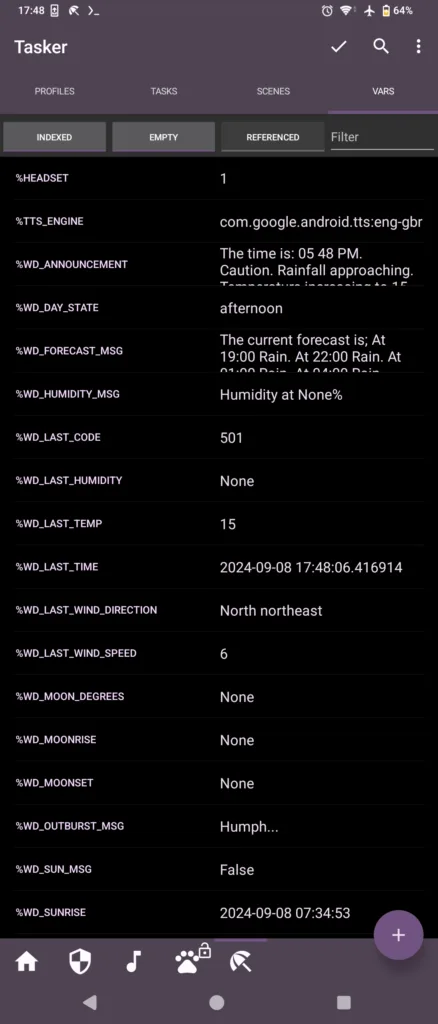
This task should be setup to parse and assign the values to Tasker variables; below is a reference the Tasker variable on the left, the intent variable on the right.
Each entry should have a “Variable set” action comprising:
%WD_LAST_CODE = %wd_last_code
%WD_SUNRISE = %wd_sunrise
%WD_SUNSET = %wd_sunset
%WD_LAST_TEMP = %wd_last_temp
%WD_LAST_TIME = %wd_last_time
%WD_LAST_WIND_SPEED = %wd_last_wind_speed
%WD_LAST_WIND_DIRECTION = %wd_last_wind_direction
%WD_LAST_HUMIDITY = %wd_last_humidity
%WD_DAY_STATE = %wd_day_state
# The main announcement = # the main announcement
%WD_ANNOUNCEMENT = %wd_announcement
# Announcement parts separated = # announcement parts separated
%WD_TIME_MSG = %wd_time_msg
%WD_WEATHER_MSG = %wd_weather_msg
%WD_TEMP_MSG = %wd_temp_msg
%WD_WIND_MSG = %wd_wind_msg
%WD_SUN_MSG = %wd_sun_msg
%WD_HUMIDITY_MSG = %wd_humidity_msg
Running the weather status again should now update the Tasker variables on completion.
From here there are many possibilities for automation.
Tasker screenshot reference
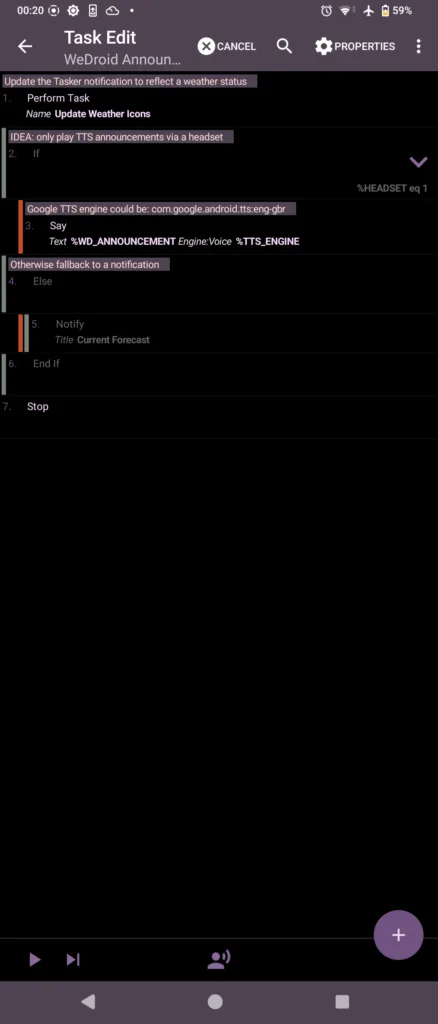
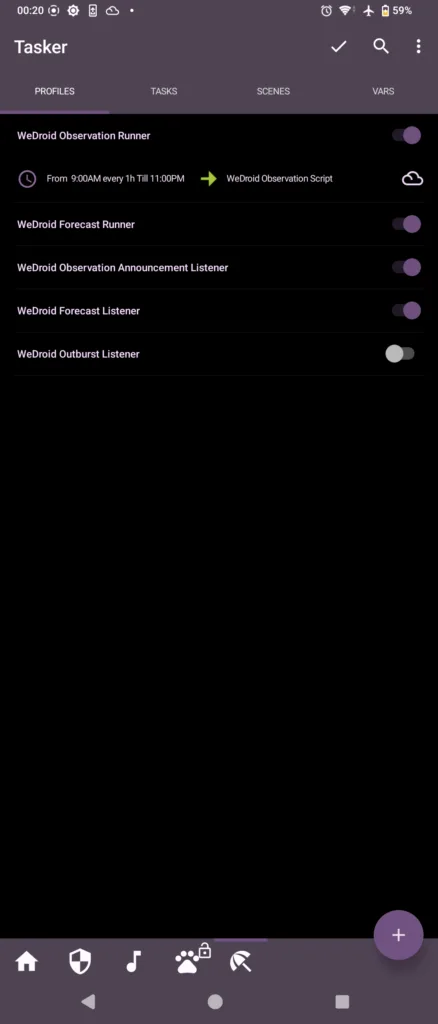
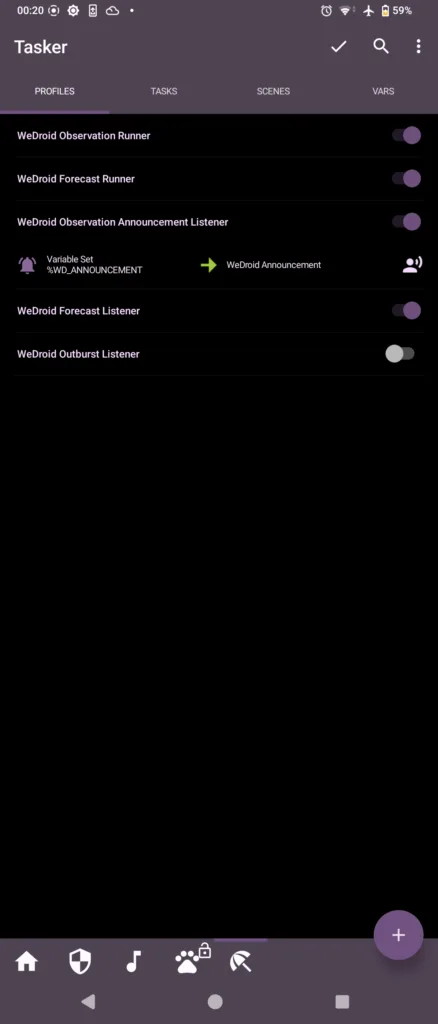
Disclaimer & Notices
New release for GLaunch
descriptionStandardWe have recently updated our GLaunch application across multiple platforms:
- GLaunch on Android
- GLaunch for Chrome
- GLaunch on the Web
GLaunch – Legacy

A utility for quickly accessing Google services
This application is now depreciated; note that the recent 2024 update brought manifest v3 support for continued use under Google’s new Extension requirements.
GLaunch is a simple extension that provide a popup link panel to numerous Google services. Services can be quickly filtered by typing the name of the desired service name.
Many services now features sub actions that provide quick access to common functions within select services.
GLaunch can be used as your new tab page, opened as a new tab or standalone window along side the Chrome extension panel.
Core Features
- Improved Material based Design.
- Quickly search and find Google Services (+ Quick actions to common functions).
- Ability to add custom links.
- Filters services as you type.
- Links open in a new tab (+ Incognito window support).
- Open with Key binding (CTRL + SHIFT + Y) or customise to your own preference.
- Discover Google Services you did not know existed!
- Right click context menu based quick searches for Google Maps and YouTube.
- Select & Search; you can use GLaunch to highlight an address and right click to search Google Maps.
- Select & Search; You can also highlight sentences and search Youtube for videos.
GLaunch is available on Google Play, Chrome Web Store and a web variant.

 Available in the
GLaunch news and updates
Disclaimer & Notices
Please note that the icons used to represent each service are the official icons by Google they were sourced from the service itself.
Any of the trademarks, service marks, collective marks, design rights or similar rights that are shown, mentioned or cited on the extension are the property of their respective owners and not of Integrated Brands, its contributors or visitors.
The word mark, “Google” and the logo, and any associated service logos are copyright. That copyright is held by Google.