Following our previous entry introducing the WeDroid weather assistant for Python 3. This article covers WeDroid with Termux and Tasker on Android devices.
Presenting WeDroid a weather summary & announcement utility, cross platform (runs on anything that can run Python 3.9+) with additional bonuses for Android users through support for Tasker and/or Termux.
WeDroid is a weather summary & announcement package for Python 3, cross platform (runs on anything that can run Python 3.9+) with additional bonuses for Android users through support for Tasker and/or Termux.
The Tasker integration allows WeDroid to update variables declared in Tasker (through an Intent); you can use these Tasker variables to then trigger additional tasks for example Text-to-speech. Termux is used to provide a shell and enable the installation of Python 3 and uses Termux-API to access the device location; view the source for this integration in Termux integation WeDroid.
If you’re eager to try it for yourself (that is: running WeDroid on Android via Termux using Tasker as the controller/trigger); it’s relatively straight forward and the information below should help you get started:
As previously mentioned in “Unveiling WeDroid a weather assistant module for Python 3“; WeDroid was originally a weather reporting script that returned the current weather status in a short message form. It was written right after the Metal Gear Solid V: The Phantom Pain’s release and was heavily influenced by the iDroid weather reports that Venom Snake would receive in-game. These reports would indicate drastic changes like sandstorms, rain, or the weather clearing.
Installation requirements (Android)
Tasker
Termux (other shells are likely supported where you can install Python 3)
Termux configured to access local storage
Termux:API plugin
If you intend to allow WeDroid to access location data Termux:API needs to be configured to allow location access.
Termux:Tasker plugin
When used with Tasker on Android you can define a task and/or profile which can run the WeDroid announcement service.
Tasker Workflow
To summarise Tasker is used to:
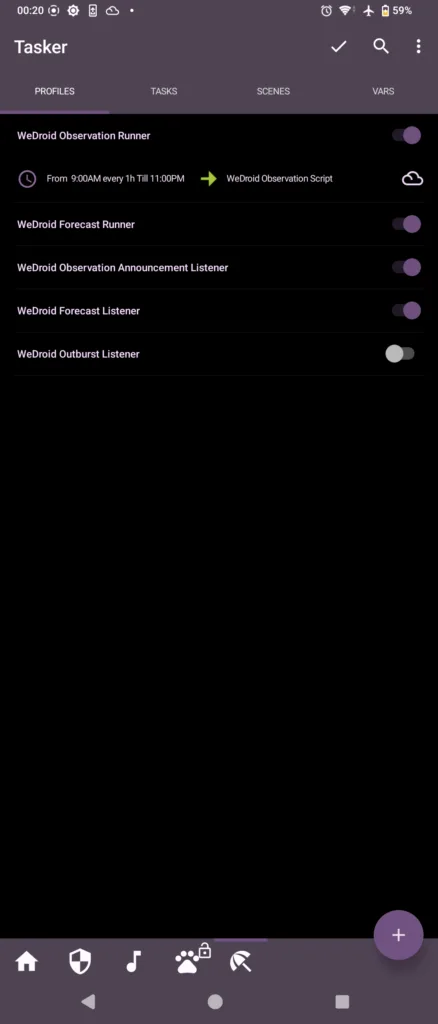
Run WeDroid on a schedule.
Process an intent created from WeDroid with various pieces of weather data and extract the values to Tasker variables.
Then trigger an announcement (or action/s) when certain changes occur.
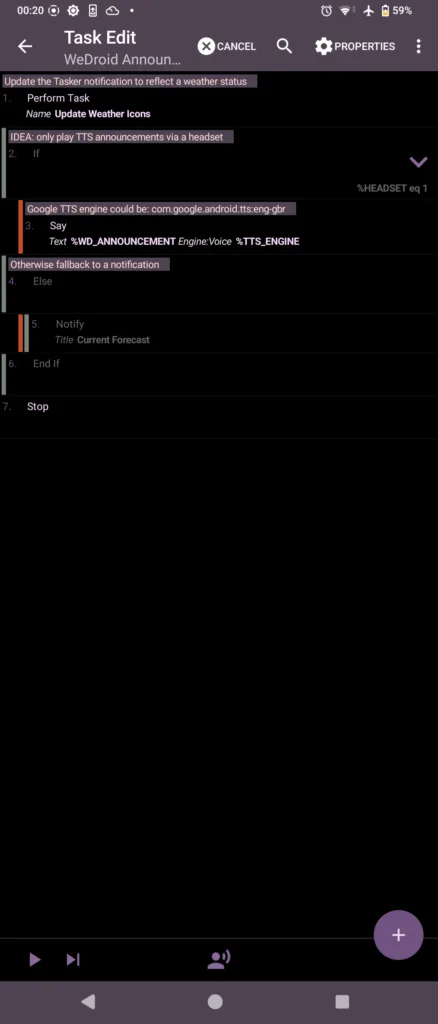
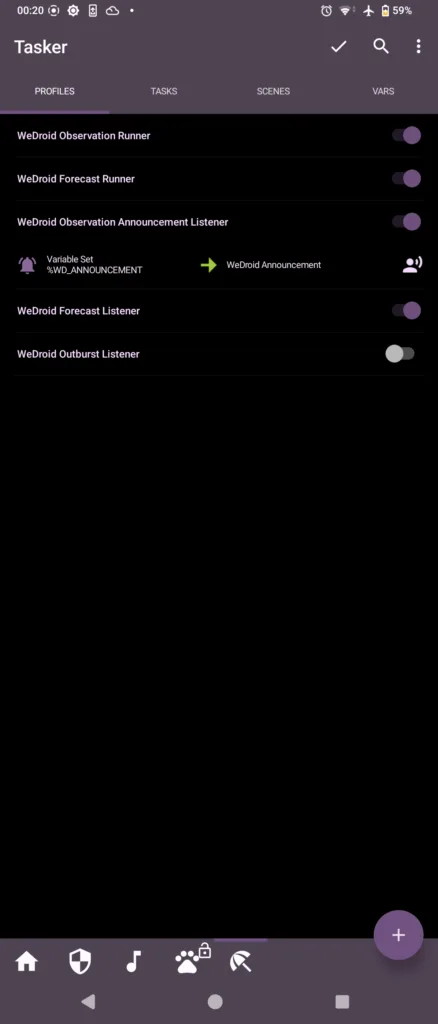
The simplest use case is to trigger a WeDroid observation every hour; and when the %WD_ANNOUNCEMENT variable is update speak the content using text-to-speech.
Tasker configuration breakdown
To run WeDroid and Python 3 under Termux with Tasker review the following details:
Python 3 via Termux requires:
Termux to be installed.
Python 3 package is installed with: pkg install python.
WeDroid installed with: pip install wedroid.
In your home directory create a WeDroid configuration with: wedroid -d.
Once created edit wedroid_settings.json and add your OWM (OpenWeatherMap) API key, create one here.
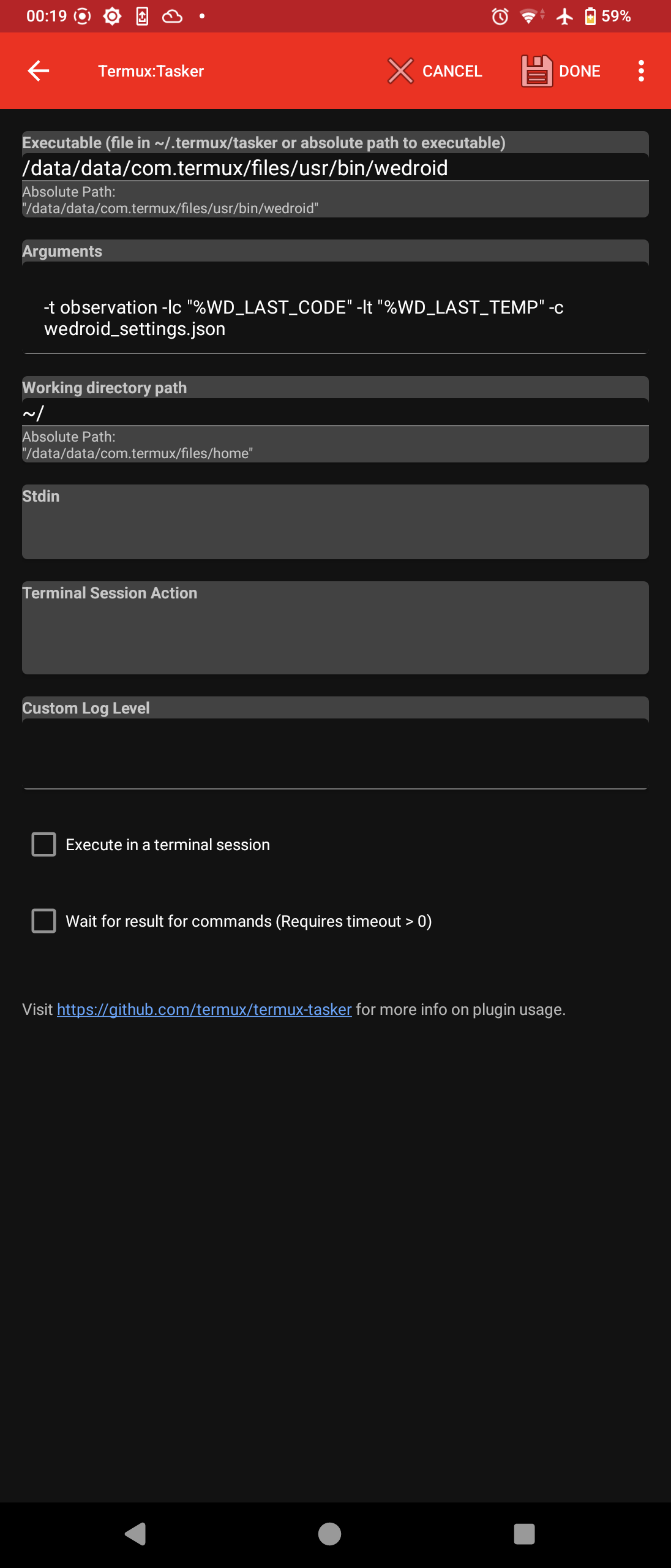
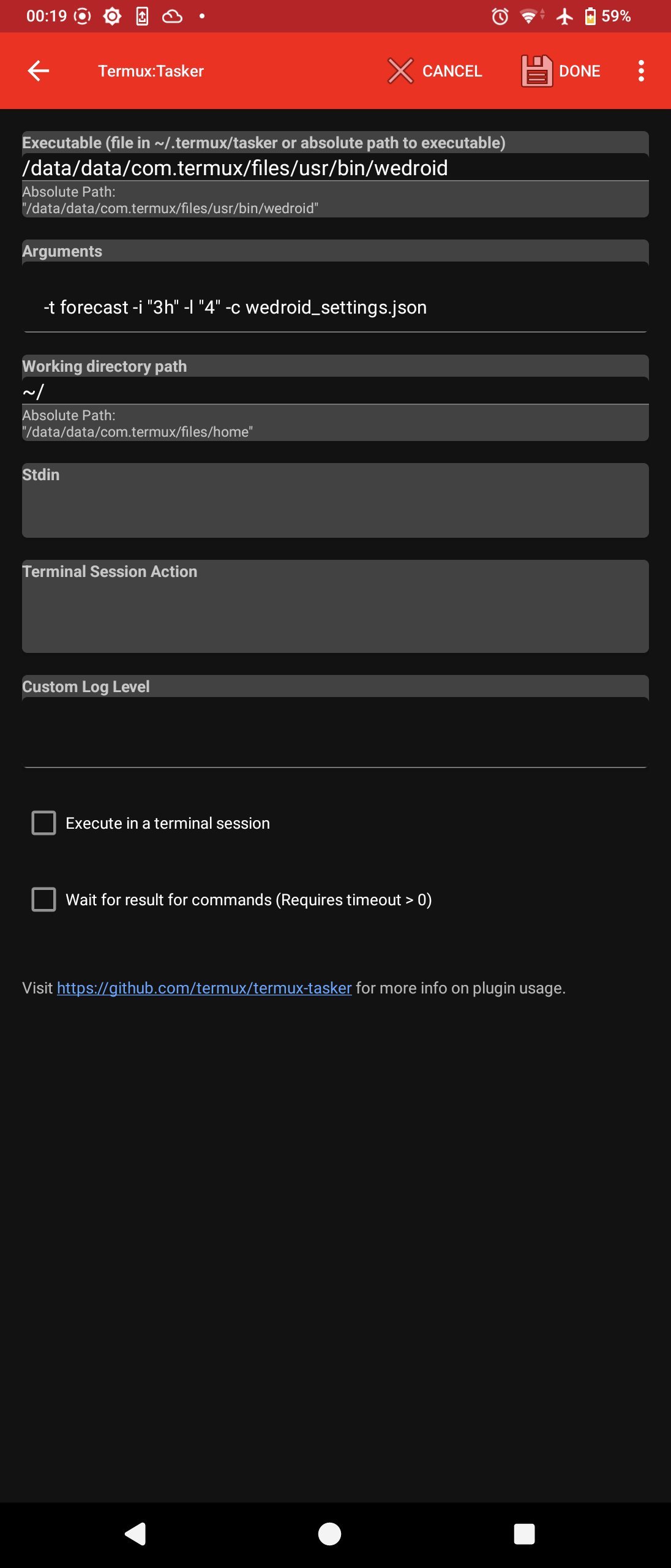
The Tasker Task responsible for running WeDroid is “Run Termux Script” provided by Termux:Tasker:
It should execute: /data/data/com.termux/files/usr/bin/wedroid -t "observation" -lt "14.0" -lc 812
In executable add: /data/data/com.termux/files/usr/bin/wedroid
In arguments add: -t "observation" -lt "14.0" -lc 812 optionally include a path to your configuration if in a different location: -c "/path/to/some/where/wedroid_settings.json"
The screenshot below demonstrates how to configure a Termux:Tasker action within Tasker; take note of the executable file: /data/data/com.termux/files/usr/bin/wedroid
At this point the basic configuration aspect is complete; run the newly created task to ensure that it is working as expected.
If you run a observation or forecast; once complete, WeDroid sends an intent back to Tasker with various data variables and the Task name (WeDroid Received) that will parse these values:
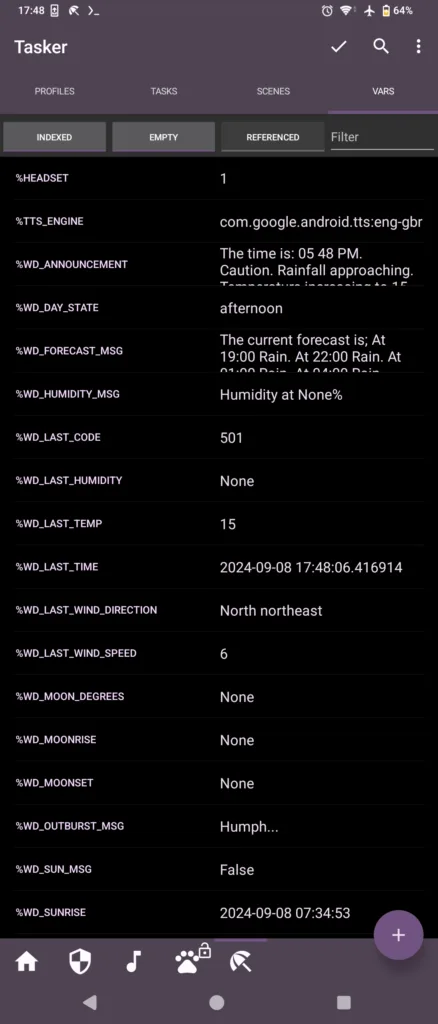
This task should be setup to parse and assign the values to Tasker variables; below is a reference the Tasker variable on the left, the intent variable on the right.
Each entry should have a “Variable set” action comprising:
Running the weather status again should now update the Tasker variables on completion.
From here there are many possibilities for automation.
Tasker screenshot reference
WeDroid related Tasker variablesWeDroid announcement (text-to-speech) exampleWeDroid profiles and observation runner example triggers the WeDroid scriptWeDroid profiles and observation listener example triggers the text-to-speech task
To provide the best experiences, we use technologies like cookies to store and/or access device information. Consenting to these technologies will allow us to process data such as browsing behaviour or unique IDs on this site. Not consenting or withdrawing consent, may adversely affect certain features and functions.
Functional
Always active
The technical storage or access is strictly necessary for the legitimate purpose of enabling the use of a specific service explicitly requested by the subscriber or user, or for the sole purpose of carrying out the transmission of a communication over an electronic communications network.
Preferences
The technical storage or access is necessary for the legitimate purpose of storing preferences that are not requested by the subscriber or user.
Statistics
The technical storage or access that is used exclusively for statistical purposes.The technical storage or access that is used exclusively for anonymous statistical purposes. Without a subpoena, voluntary compliance on the part of your Internet Service Provider, or additional records from a third party, information stored or retrieved for this purpose alone cannot usually be used to identify you.
Marketing
The technical storage or access is required to create user profiles to send advertising, or to track the user on a website or across several websites for similar marketing purposes.